
If we thought generating a photorealistic photograph with a single sentence was impressive, what is happening right now with video defies all logic. Barely 18 months ago, videos made with AI were an unsettling curiosity: deformed characters eating spaghetti in a grotesque manner and backgrounds that flickered uncontrollably.
Today, we are seeing clips that are indistinguishable from a Netflix production.
AI video generation (Text-to-Video) is the most ambitious technical leap of the last decade. It is no longer just about painting pixels; it is about the machine understanding how the world moves, how gravity affects fabric, and how light changes when an object turns.
In this guide, we will explore how this technology works, which tools define the market, and, most importantly, how you can start directing your own scenes without leaving your desk.
The Technical Challenge: Temporal Coherence
To understand why making video is so difficult, think of a flipbook (those little books with drawings in the corners that, when flicked through quickly, appear to move).
To create 5 seconds of fluid video, the AI doesn't just have to generate one image; it has to generate at least 120 consecutive images (frames). But the real challenge is Temporal Coherence. If the character has a blue shirt in frame 1, the AI cannot "forget" that fact in frame 10 and put them in a green shirt, nor can it change the actor's face when they turn their head.
New models utilise advanced architectures (such as Diffusion Transformers, the technology behind the famous Sora model) that understand video not as loose photos, but as a three-dimensional block of data where time is just another dimension. This allows objects to maintain their shape and "physics" throughout the sequence.
The Great Film Studios in the Cloud (The Tools)
The landscape of AI video changes almost weekly. As of today, these are the virtual "cameras" defining the industry:
A. The Giants of Realism
Runway (Gen-3 Alpha)
- The industry standard. Runway is a complete creative suite. It offers incredible granular control: you can use a "motion brush" to tell the AI, "I want only the clouds to move, not the building".
- Best for: Filmmakers and advertisers who need specific control over camera and movement.
Luma Dream Machine
- The accessible option. It is fast, free to try, and capable of generating very dynamic movements. It understands the physics of objects colliding or interacting very well.
- Best for: Quick creation of memes, social media clips, and experimentation.
Kling and Hailuo (MiniMax)
- The Asian vanguard. Currently, these models (originating from China) are leading the race in human realism. Hand movements, blinking, and eating (something notoriously difficult to simulate) are surprisingly natural.
- Best for: Extreme human realism and long-duration clips (up to 10 seconds).
B. The Tech Giants
Google Veo (integrated into the Gemini/YouTube ecosystem)
- Google has presented Veo as its direct competitor. It stands out for understanding technical cinematic terms ("timelapse", "aerial shot") and for its future direct integration into YouTube Shorts, democratising instant creation.
Sora (OpenAI)
- The model that started the current craze. Although access remains restricted, it proved that AI could simulate complex worlds with coherence.
The Art of Directing: Prompting for Video
If in static imagery we were photographers, here we are film directors. A text prompt for video requires an extra layer of information: Camera Movement.
The AI needs to know where the viewer is. It must learn these basic terms:
- Pan: The camera rotates on its axis (left/right).
- Tilt: The camera looks up or down.
- Zoom In / Out: Moving closer or further away.
- Truck / Dolly: The entire camera physically moves (following the character).
- FPV (First Person View): Drone view or first-person perspective, very dynamic and fast.
The Video Prompt Formula: [Subject] + [Action] + [Setting] + [Camera Movement] + [Style]
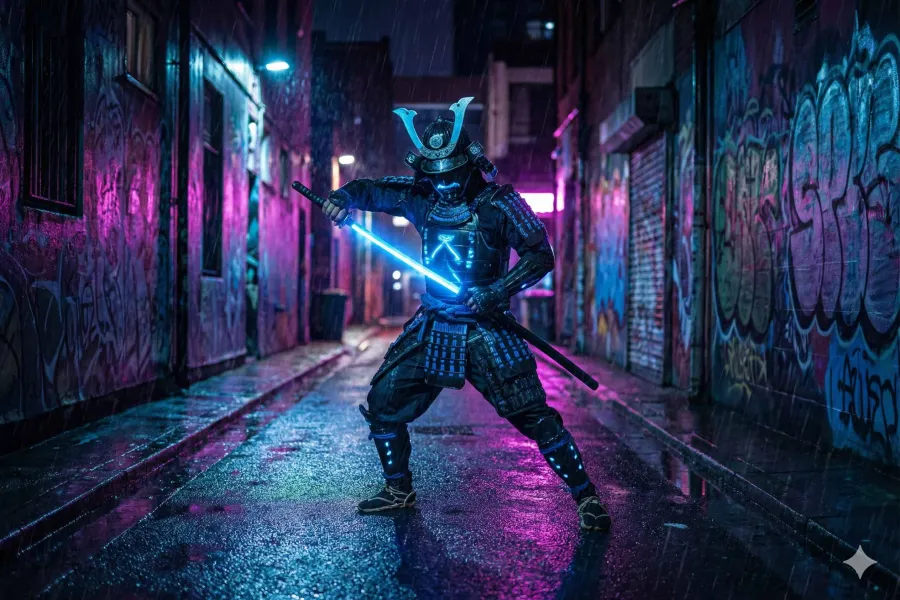
Example: "A cybernetic samurai unsheathing a glowing katana (Action), in a neon alleyway under the rain (Setting), the camera performs a slow Zoom In towards his eyes (Camera), 80s action film style, anamorphic (Style)."
The Professional Workflow: From Photo to Video
Here is the secret that basic tutorials rarely tell you: Professionals almost never use "Text-to-Video" directly.
Why? Because text is random. If you write "a dog jumping", the AI will invent the dog, the background, and the jump all at once, and it probably won't be exactly what you imagined.
The professional workflow ("Image-to-Video") is as follows:
- Step 1: Generate the "Keyframe" (Image): Use an image AI (like Midjourney or Flux) to create the perfect image. Here you control the lighting, the character's face, and the composition with total precision.
- Step 2: Bring it to Life (Image-to-Video): Take that static image to tools like Runway or Luma. Upload the image and use the prompt only to describe the movement: "The character smiles and turns their head". Result: The AI maintains the perfect aesthetic of your original image and only animates what is necessary.
- Step 3: Extension and Lip-Sync: Videos usually last 4 or 5 seconds. To make it longer, the "Extend" function is used, which takes the last few seconds and generates 5 more. To make characters speak, lip-syncing tools (like Sync Labs or Hedra) are used, which move the generated character's mouth to the rhythm of an audio track.
- Step 4: Upscaling and Fluidity: AI video often comes out with low resolution or few frames per second. Post-production AI tools (like Topaz Video AI) increase the resolution to 4K and interpolate the frames so that the movement is silky smooth (60fps).
Limitations and Ethics
It is vital to be transparent about what this technology still does not do well:
- The "Boiling" Effect: Sometimes, textures like grass or gravel seem to move or "boil" on their own. It is a common consistency flaw.
- Physical Logic: An AI can make a video of a glass falling, but sometimes the glass bounces instead of shattering, or water flows upwards. The AI "hallucinates" physics; it does not calculate it like a real simulator.
- Hardware: Unlike images, generating video locally on your PC requires extremely powerful graphics cards (24GB of VRAM or more), so almost all serious work is done by paying for cloud services.
We are witnessing the birth of a new form of storytelling. AI video allows a single person to visualize stories that previously required a crew of a hundred technicians and millions of pounds.
However, the tool does not make the filmmaker. Pacing, narrative, emotion, and editing remain the human domain. AI can generate a spectacular shot of an explosion, but only you know why that explosion is important to the story.