
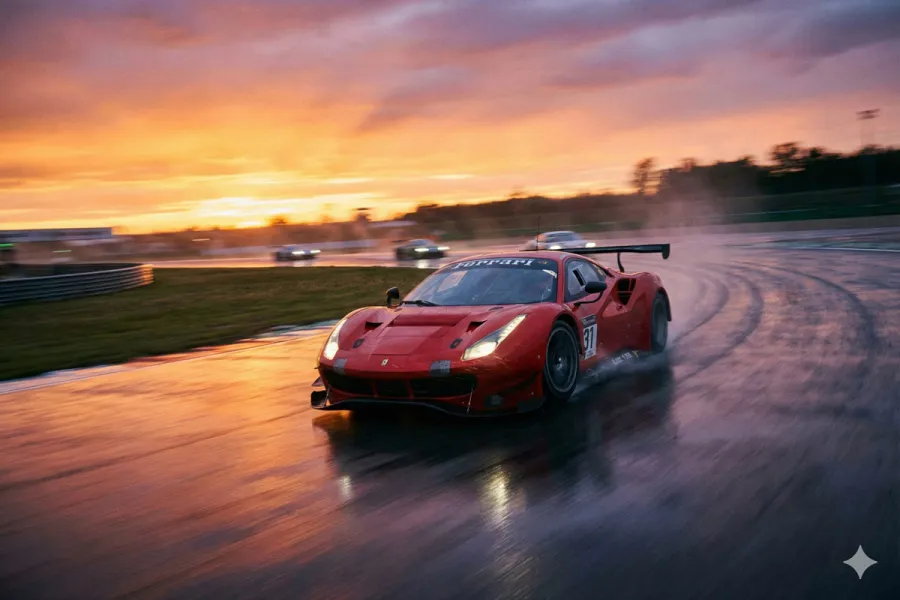
Just a few years ago, creating a photorealistic image required a camera, extensive knowledge of lighting, and years of experience. Today, we are witnessing a technological revolution comparable to the invention of photography in the 19th century. "Synthetic photography", or generative AI, does not seek to replace the camera, but rather to expand the boundaries of our imagination.
However, there is a common misconception that AI performs "magic" with the simple push of a button. The reality is far more nuanced: AI is a sophisticated instrument, and like any instrument, it requires technique and understanding to yield professional results.
In this article, we will break down the science behind this technology, the tools that define the market, and the precise workflow for creating striking images.
Understanding the Engine: Diffusion Models
To master these tools, one must first understand what they do. Most current AIs operate using Diffusion Models.
Imagine a screen filled with "noise" or static, much like an old television set with no signal. The AI has been trained on billions of images and their descriptions. When you ask for "a cat in the garden", the AI begins with that static noise and, step by step, removes whatever does not look like a cat, sculpting the image from chaos into clarity. It is not "cutting and pasting" photos from the internet; it is calculating a new image, pixel by pixel, that has never existed before.
The Ecosystem of Tools: Choose Your Brush
Not all AIs are created equal. Each "model" has a distinct architecture and training, giving them unique personalities. Choosing the right model is as important as choosing between watercolours and oil paints.
The Market Leaders
These days, AI image-generation engines can turn a simple idea (or just a few words) into illustrations, photos, and visual styles ready to use in record time.
Midjourney
- Its speciality: The most "artistic" model. It has a strong aesthetic bias towards dramatic lighting, rich textures, and cinematic compositions.
- Best for: Creatives seeking visual beauty, conceptual illustration, and editorial photography without needing to specify every technical detail.
DALL-E 3 (OpenAI)
- Its speciality: Linguistic comprehension. Being connected to ChatGPT, it understands complex instructions and abstract nuances better than any other.
- Best for: Situations where fidelity to the instruction is vital (e.g., "a polar bear drinking coffee in a New York bar reading a newspaper about the climate crisis").
Flux.1
- Its speciality: Extreme realism. Currently, it is the standard for generating convincing human skin and legible text within the image (something older AIs struggled with immensely).
- Best for: Realistic stock photography and graphic design that includes typography.
Nano Banana (Google Gemini)
- Its speciality: Conversational editing and visual reasoning. This engine, which powers Google’s imaging capabilities, excels at "understanding" the image once created.
- Best for: Interactive workflows. Unlike other static models, Nano Banana allows for fluid dialogue: "Change the background to a park" or "Add some sunglasses". Its native In-painting capability is intuitive and conversational.
Stable Diffusion
- Its speciality: Total control. It is an open-source model.
- Best for: Technical professionals who wish to install the software on their own equipment to ensure absolute privacy and customisation.
Prompt Engineering: How to Speak to the Machine
The Prompt is the textual instruction we give to the AI. Many beginners write simple sentences and get generic results. A "prompt engineer" structures their requests as if they were a film director giving instructions to their crew.
An effective formula for achieving photorealism includes these four pillars:
- Subject (The What): Be descriptive. Instead of "a woman", use "an elderly woman with deep wrinkles and a serene expression".
- Context and Action (The Where): "Sitting on a wooden porch during a rainy autumn afternoon".
- Style and Medium (The How): Here we define the aesthetic. "Documentary photography, National Geographic style, 35mm film grain".
- Technical Parameters (The Camera): Speak the language of photographers. "Soft diffuse lighting, low depth of field (blurred background), 85mm lens, high resolution".
Comparative Example:
- Basic Prompt: "Photo of a fast car."
- Advanced Prompt: "Action shot of a red sports car on a racing circuit, motion blur, wet tarmac, sunset reflections, low angle, wide-angle lens, dramatic lighting, hyper-realistic."
Beyond Text: Professional Techniques
Professionals rarely get the perfect image on the first attempt. They use advanced tools to refine the result.
Image-to-Image
Sometimes, describing a composition with words is difficult. With this technique, you provide a reference image (a quick sketch on a napkin or a poorly lit photo) and ask the AI to use it as a "skeleton" to generate the final image. It is fundamental for maintaining consistency in composition.
In-painting (Selective Editing)
This is the ultimate correction tool. If the image is perfect but the AI has drawn a hand with six fingers (a common error), you needn't discard the photo. With In-painting, we select only the hand and order the AI: "regenerate this area". This is where engines like Nano Banana shine, allowing you to make these changes using natural language ("fix the hand") rather than complex manual selections.
ControlNet (Advanced Structure)
Exclusive to advanced models like Stable Diffusion, this allows you to copy the exact posture of a person or the structure of a building from a real photo and apply it to the generation. It is the difference between letting the AI "guess" the pose and ordering it exactly how it must be.
The Workflow: From Concept to Masterpiece
How is a cover image created? This is the recommended step-by-step process:
- Assisted Ideation: You can converse with an AI chatbot to help enrich your visual vocabulary and draft a detailed prompt.
- Generating Variations: Generate multiple versions (between 4 and 10). AI has a random component; more variations increase the chances of success.
- Curating: Select the image with the best lighting and expression, even if it has minor flaws.
- Restoration (In-painting): Correct any errors (asymmetrical eyes, extraneous objects in the background).
- Upscaling: AI often generates small images. Use AI-powered upscaling tools. These not only stretch the image, but also "imagine" (logically invent) details like skin pores or fabric textures so that the photo appears sharp when printed or viewed on large screens.
- A human touch in programs like Photoshop to adjust color and contrast is what ultimately brings the image to life.
Hardware Considerations (For the Advanced User)
If you decide to opt for open-source models like Stable Diffusion to run on your own computer (locally), you should know that these operations are mathematically intensive.
They don't depend so much on the processor (CPU) speed, but rather on the Graphics Card (GPU). Specifically, they require a lot of video memory (VRAM). Think of VRAM as a "worktable": the larger it is, the more complex and larger the image that the AI can manipulate at once.
Recommendation: An NVIDIA graphics card with at least 8GB of VRAM is suggested to start, although 12GB or more is ideal for smooth, professional work.
AI-powered image generation is not the end of human creativity, but rather a new tool in our arsenal. Just as photography didn't kill painting, generative AI opens new avenues of expression. It requires patience, technical learning, and, above all, a discerning eye to distinguish between a randomly generated image and a work of art imbued with intention and soul.
Whether using the aesthetic power of Midjourney or the conversational intelligence of Nano Banana in Gemini, the limit is no longer your manual dexterity, but your ability to imagine and describe new worlds.